Getting the Adapter Package
The BMC Atrium Orchestrator Application Adapter for EMC Storage can be obtained from BMC EPD Web site and from Sentry Software Web site.
The package file name is: sentry-adapter-emc-storage-1.2.00.zip. It contains the aroar packages for both the Actor and Monitor Adapters, as well as the corresponding module (that will be loaded into Development Studio):
| • | sentry-adapter-emc-storage-actor_1.2.00.aroar |
| • | sentry-adapter-emc-storage-monitor_1.2.00.aroar |
| • | AO-AD-EMC_Storage.1.2.00.roar |
Uploading the Package (aroar) file in the BMC Atrium Orchestrator Repository
| 1. | Use your Web browser to connect to the BMC Atrium Orchestrator Grid Manager with administrative credentials. |
| 2. | In the Manage tab click the Upload Adapter button. |
| 3. | On the next page, select the Actor Adapter .aroar file to be uploaded and click OK. |

Selecting the Actor Adapter to be uploaded
| 4. | Repeat the same operation for the Monitor Adapter. |
| 5. | The adapters are then listed in the BAO Grid Manager repository and ready to be added to the Grid and configured. |
Loading the module (roar) in BMC Atrium Orchestrator Development Studio
| 1. | In the BMC Atrium Orchestrator Development Studio, switch to the Library Manager view |
| 2. | Open the tab Import Modules and click the From Disk button |
| 3. | Select the .roar file to be imported. |
| 4. | Click the checkbox Import and Unbundle and then click the Import button. |
| 5. | Switch to Designer view, to visualize the loaded module. |
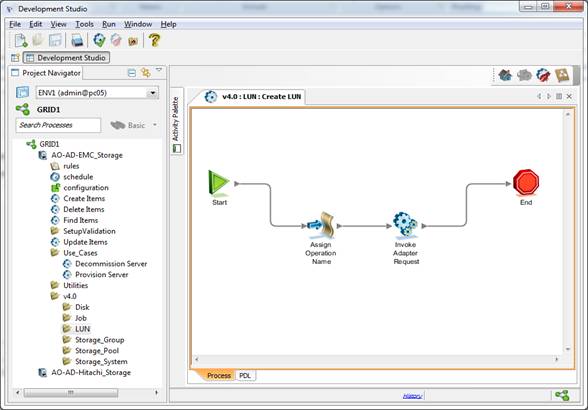
Visualizing the loaded module
| 

