-
Home
- PATROL
Administer IBM Spectrum Protect
PATROL users with appropriate rights can administer IBM Spectrum Protect with IBM Spectrum Protect KM for PATROL. They can more especially:
- start or stop the server/storage agent
- administer:
- cancel processes
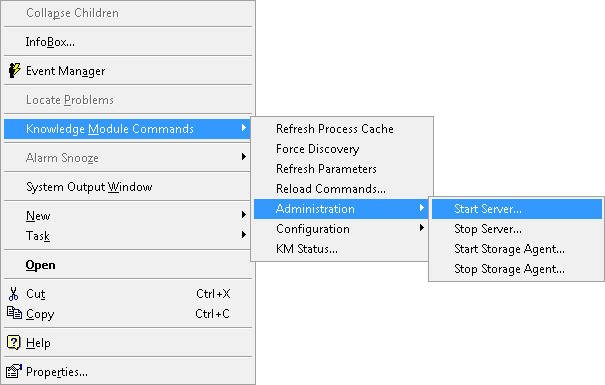
Starting the Server/Storage Agent
To start the server/storage agent:
-
In the PATROL console, right-click the server instance > KM Commands > Administration
-
Select Start Server… or Start Storage Agent…

Stopping the Server/Storage Agent
To stop the server/storage agent:
-
In the PATROL console, right-click the server instance > KM Commands > Administration
-
Select Stop Server… or Stop Storage Agent…


Administering Mount Requests
Each time a mount request appears, an alert is triggered on the TSMRequestTimeout parameter. Some requests will automatically continue processing, others will require that you notify that the requested action was actually performed. To send the notification, right-click the relevant mount request instance > Administration > Canel.
To cancel:
- a mount request, right-click the relevant mount request instance > Administration > Cancel
- all mount requests at once request, right-click the Mount Requests instance >
A mount request can be canceled from the relevant mount request instance, using the menu Administration > Cancel, or you can cancel all mount requests at once from the container instance (labeled: Mount Requests) using the menu Administration > Cancel.
Administering Drives
To administer manual or automatic library drives, right-click the relevant drive instance and select one of the following options:
- Administration > Clean Drive
- Administration > Online Drive
- Administration > Offline Drive
Cancelling Processes
To cancel processes, right-click the relevant process instance and select Administration > Cancel Process.